
Complete DPIA Lifecycle — Screening to Risk Closure
DPIA Suite guides your organization through the full Data Protection Impact Assessment process. Structured questionnaires, three-mode risk identification — AI, rule engine, and manual flagging — and audit-ready reports, all in one governed platform.
Your Record of Processing Activities Tells You When a DPIA Is Needed
DPIA Suite connects to your ROPA — the Article 30 register of processing activities. When a processing entry carries high inherent risk, the platform flags it and initiates a DPIA assessment automatically, ensuring no high-risk activity slips through unassessed.
High-Risk Processing Detected
Systematic profiling, large-scale sensitive data, or biometric processing in ROPA automatically triggers a DPIA requirement.
Screening Outcome Escalates Automatically
The screening questionnaire evaluates the processing activity and escalates to a full DPIA if risk thresholds are met.
Pre-Populated from ROPA Metadata
Processing purpose, data categories, recipients, and retention periods flow from ROPA into the DPIA questionnaire — no double entry.
Two-Way Linkage
The completed DPIA is linked back to the ROPA entry, keeping your Article 30 register complete and audit-ready.
One Platform. Every Stakeholder Covered.
DPIA Suite is built around the real workflows of compliance teams — with distinct, purpose-fit experiences for DPOs and Department Admins.
DPOs & Compliance Admins
Initiate assessments, configure questionnaire categories, review and approve answers, identify and score risks using AI or rule-based engines, oversee mitigation progress, and generate audit-ready DPIA reports — with full lifecycle visibility at every stage.
Department Admins
Complete structured DPIA questionnaires section by section, track assessment progress, respond to flagged answers, attach supporting documentation, submit risk justifications, and coordinate mitigation actions — all within a guided, structured interface.
The Complete DPIA Lifecycle
A structured, enforced workflow from initial screening through risk closure — every step governed, every transition audited.
Screening
A structured screening questionnaire evaluates the processing activity against GDPR Article 35 criteria. The system automatically determines whether a full DPIA is required or low-risk. ROPA-flagged activities bypass screening and go straight to DPIA.
DPIA Assessment
The Department Admin completes a structured, multi-category questionnaire covering data types, processing purposes, retention, third-party sharing, security measures, and more. Each question supports notes, justifications, and document uploads.
Review
The DPO reviews each questionnaire answer — approving, rejecting with remarks, or flagging for risk escalation. Rejected answers are returned for resubmission. Risk-flagged answers automatically surface in the Risk stage.
Risk
Flagged answers generate risk candidates automatically. The DPO can enrich the risk register using AI-generated suggestions or pre-configured GDPR rule engine entries. Each risk is scored on a 3×3 Likelihood × Impact matrix and categorized.
Mitigation
Risks are assigned to Department Admins with due dates and responsible persons. Admins submit mitigation plans or justifications. The DPO reviews, requests revisions, or approves. Residual risk scores are captured after treatment.
Closure
Once all risks reach an acceptable residual level, the DPO formally approves the DPIA closure. Accepted residual risks are documented with rationale. The assessment is marked complete with a full timestamped audit trail.
Report
Generate the complete DPIA Assessment Report and Risk Register Report on demand — capturing every answer, decision, risk entry, mitigation action, and closure approval. Regulator-ready from the moment it's produced.
Three Modes to Surface Every Risk — Nothing Missed
DPIA Suite combines human judgment, AI analysis, and deterministic GDPR rules into a unified risk identification engine that feeds a single, governed risk register.
From Flagged Answer to Structured Risk Entry
Every risk in DPIA Suite traces back to a source — a flagged questionnaire answer, an AI suggestion from the analyzer, or a rule engine trigger. All three modes produce structured, scoreable risk entries that land directly in the risk register as drafts for DPO review.
Flagged Question Engine
DPO marks answers as risk-flagged during review. Automatically surfaces as a risk candidate in the register — linked to its source question with full context preserved.
AI Risk Analyzer
Flagged answers are submitted to the AI engine. Returns fully-structured risk entries: title, category, likelihood, impact, description, and contingency plan — ready for one-click approval.
Rule-Based Risk Engine
Pre-built GDPR rules scan answers deterministically. Known patterns — retention violations, missing notices, cross-border gaps — auto-populate matching risk entries without manual intervention.
Manual Risk Entry
DPOs can add risks directly to the register at any time — documenting domain knowledge, expert judgment, or contextual risks that fall outside automated detection.
A Living Risk Register — Governed from Identification to Closure
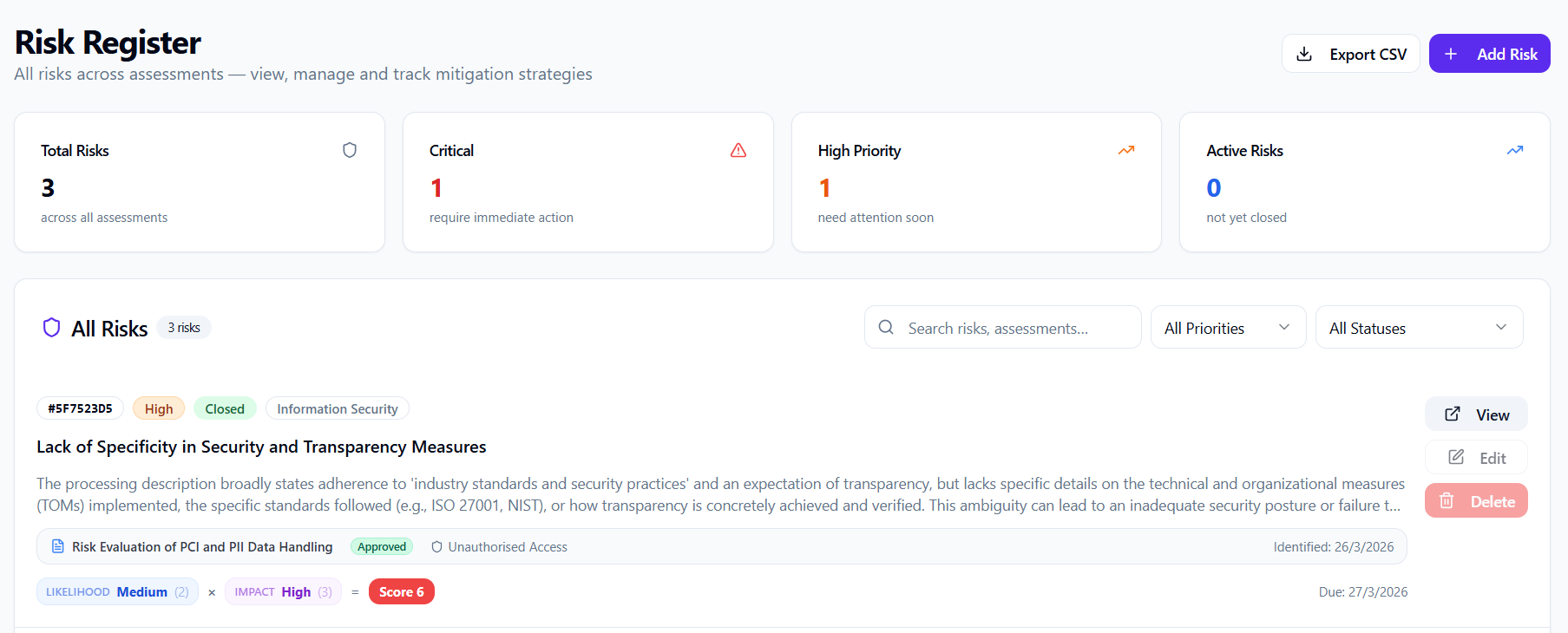
Every risk across all assessments flows into a centralized, structured register. Each entry is trackable, assignable, scoreable, and linked directly to its source — powered by AI, rule engines, and human review.
Structured Risk Entries
Every risk captures a complete record: title, description, source question, category, assigned department, responsible person, due date, mitigation strategy, and current status — all linked to the originating assessment.
Governed Lifecycle Workflow
Each risk follows a defined, enforced state machine. Department Admins submit justifications; DPOs review, request revisions, or approve closure. Every transition is timestamped — an unbroken audit chain from identification to closure.
AI-Populated Entries
The AI Analyzer populates risk entries directly as drafts — pre-filled with title, category, scores, description, and contingency plan. DPOs review and approve in one click. Dramatically reduces documentation effort on complex assessments.
Rule Engine Auto-Population
Pre-built GDPR rules fire on known answer patterns and insert matching risk candidates into the register — no manual effort for standard exposures like retention violations, missing notices, or undocumented cross-border transfers.
Mitigation & Residual Risk Tracking
After treatment, the register captures residual risk scores alongside original scores — showing the actual risk reduction achieved. DPOs see which risks remain elevated post-mitigation and whether the residual is within acceptable bounds.
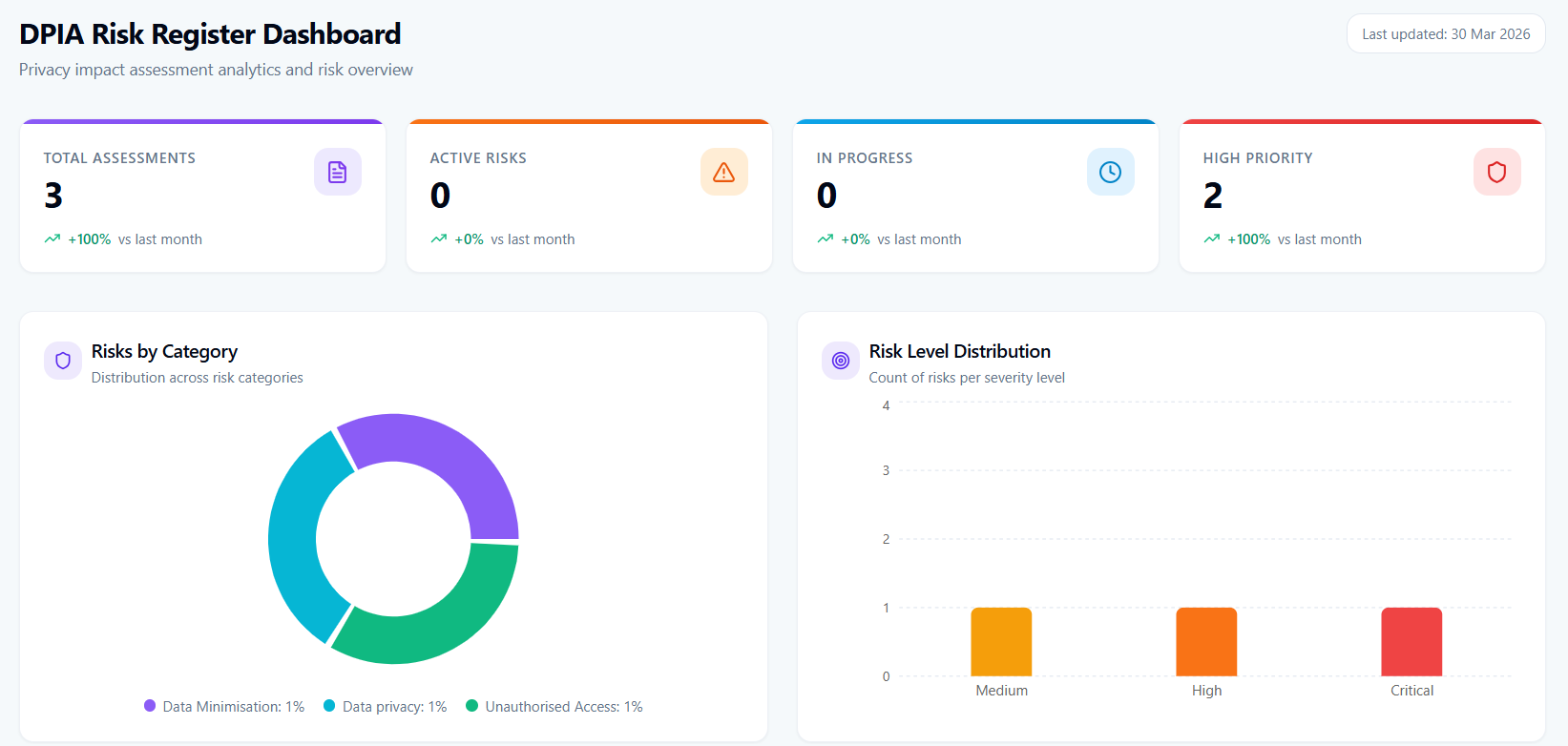
Not a Spreadsheet. A Governed Risk System.
Unlike static documentation, every register entry is a live record — linked to its source question, scored on a 3×3 matrix, assigned through a governed workflow, and tracked until closure or documented acceptance.
Coverage Across All GDPR Privacy Risk Domains
DPIA Suite's risk framework spans every major GDPR privacy risk domain — AI and rule engines are pre-configured across all categories from day one.
Audit-Ready Reports on Every Assessment & Risk
Generate comprehensive, structured reports on demand — covering the full assessment history, risk register findings, mitigation actions, and closure status. Regulator-ready from the moment they're generated.
Two Reports. Complete Compliance Documentation.
DPIA Suite produces two distinct enterprise-grade report types that together give regulators, DPOs, and auditors everything they need — without any manual compilation or formatting.
DPIA Assessment Report
Full assessment record: project metadata, every questionnaire answer with DPO review status and remarks, flagged items, uploaded documents, screening outcome, and final DPO approval signature.
Risk Register Report
Complete export of all identified risks: titles, categories, likelihood/impact scores, priority, assigned department, responsible person, mitigation strategy, residual risk score, status, and closure date — per assessment.
AI & Rule Engine Contribution Log
Documents which risks were identified via AI, rule engine, or manual flagging — demonstrating a systematic, defensible approach to risk identification for regulatory review.
Mitigation Effectiveness Summary
Original vs. residual risk scores per entry, all mitigation actions, approval timestamps, and responsible parties — evidence of risk treatment and ongoing compliance posture.
Frequently Asked Questions
Everything you need to know about DPIA Suite
Start Your First DPIA in Minutes
Join 150+ privacy teams using DPIA Suite to achieve Article 35 compliance with confidence and full auditability.